
If your nonprofit team is using the Scrum framework — or exploring it — one of the most impactful events you can invest in is the Sprint Retrospective. It’s the structured moment at the end of each Sprint where your team pauses, reflects, and commits to one meaningful improvement before moving forward. Done well, the retro is one of the most powerful tools a nonprofit team has for reducing burnout, strengthening collaboration, and continuously improving how your mission gets delivered.
This post walks through how to run a Sprint Retrospective, shares four creative retro templates your team can use, and explains how to add team happiness metrics to your retro practice.
📥 New to Scrum? Download the free Glossary of Scrum Terms — written specifically for nonprofits — and the Scrum Event Checklist to see how the retrospective fits into all 5 Scrum events.
What Is a Sprint Retrospective in Scrum?
The Scrum framework has 5 events: Sprint Planning, Daily Scrum, Backlog Refinement, Sprint Review, and the Sprint Retrospective. The retrospective — often called simply “the retro” — happens after the Sprint Review, just before the Sprint closes. It lasts 45 minutes or less and includes the full Scrum team: the Product Owner, Scrum Master, and all team members.
Unlike the Sprint Review, which focuses on what was built, the retrospective focuses on how the team is working together — and what one thing can be improved in the next Sprint. It is the engine of continuous improvement in the Scrum framework.
Retros can be held in person using a whiteboard and sticky notes, or virtually using tools like Miro or EasyRetro that all team members can access.
How to Run a Nonprofit Sprint Retrospective: The 3 Core Questions
During the retrospective, each team member responds to three questions — typically on sticky notes placed in corresponding columns on a shared board:
- What went well?
- What didn’t go well?
- What can we do differently next Sprint to improve?
Every team member adds their responses, then the group reviews what came up across all three columns. The goal is not to dwell on problems but to identify the single most impactful improvement the team can commit to for the next Sprint — what Scrum calls a Kaizen.
📥 Download the free Retrospective Guide for tips on facilitating a retrospective, custom retro templates, and step-by-step guidance for using them with your nonprofit team.
Kaizen: The One Improvement Your Team Commits to Each Sprint
After all team members have added their sticky notes, the team votes on a Kaizen — a single, concrete improvement to work on in the next Sprint. “Kaizen” is a Japanese term meaning continuous improvement, and it’s a core concept in both Agile and lean methodologies.
The Kaizen becomes the top-priority action item for the team: something small, specific, and actionable that will help the team go faster, work more smoothly, or feel better about their work. Over time, a series of small Kaizen improvements compound into significant gains in team performance and mission impact.
4 Creative Retrospective Templates for Nonprofit Teams
One of the best things about the retro is that there’s no single right way to run it. The core three questions stay the same, but the format of the board can be adapted to fit your team’s culture and energy. Here are four templates our team uses as inspiration:
Template 1: The Basic Retrospective Board

A straightforward three-column layout that maps directly to the three core questions. This is a great starting point for teams new to retrospectives — it keeps the focus on the questions without any added metaphor. Simple, clean, and easy to facilitate.
Template 2: Cars and Roads
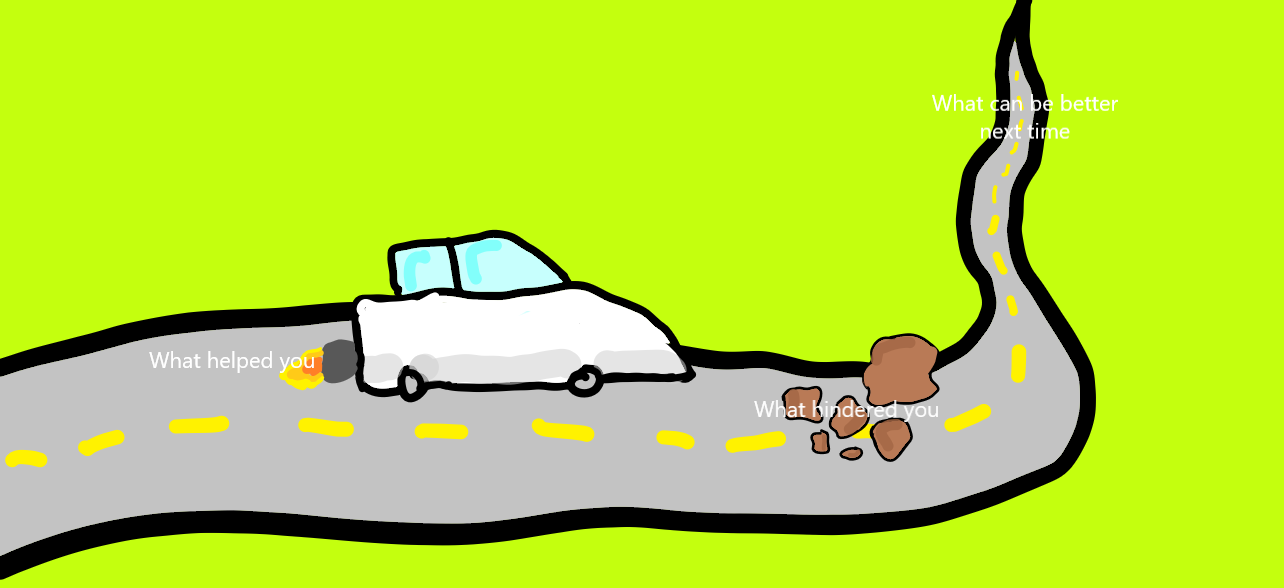
The car represents what helped your team during the Sprint, the rocks represent what slowed you down, and the road ahead represents what you’ll do better next Sprint. This template works well for teams who enjoy a little visual storytelling and want to frame progress as a journey forward.
Template 3: Spaceship and Meteors

The spaceship represents what went well, the meteors represent what didn’t go well, and the moon represents what your team can do next Sprint to go faster. This format is especially popular with teams that serve youth or STEM-focused communities — and it’s a great way to energize a retro that’s feeling routine.
Template 4: The Sailboat

The wind represents what went well and propelled the team forward, the anchor represents what held you back, and the beach on the horizon represents where you want to go next Sprint. The sailboat is one of the most versatile and widely-used retro formats — it translates beautifully to nonprofit mission language.
The bottom line: be creative with your team! Variety keeps the retro feeling fresh, and a team that enjoys their retro is a team that actually shows up and contributes to it.
Adding Team Happiness Metrics to Your Sprint Retrospective
One of the most valuable additions a Scrum Master can make to the retrospective is a team happiness check-in. At the end of the retro, ask each team member to rate their happiness on a scale of 1–5 across four dimensions:
- How happy are you in your role?
- How happy are you with your team?
- How happy are you with the organization?
- What would make you feel happier?
Tracking these scores Sprint over Sprint gives the Scrum Master meaningful data about team wellbeing over time — not just a snapshot. If happiness scores dip in a particular dimension, that’s a signal to address what’s driving the change before it turns into burnout or turnover. A happy team is a faster team: team happiness has a direct and measurable impact on Sprint velocity.
📥 Download the free Sustainable Pace Guide for methods to use data — including happiness metrics — to ensure your team is working at a pace that is effective and sustainable. And if your team is navigating values conversations, the Value Facilitation Guide offers structured approaches for facilitating those discussions.
Ready to Take Your Retrospectives Further?
The retrospective is one of the five Scrum events — and all five work together to create the rhythm of continuous improvement that makes Scrum so effective for nonprofit teams.
📥 Download the Getting Started with Scrum Checklist to begin your team’s Scrum journey, and explore our upcoming Scrum training courses — including the Registered Scrum Master course for nonprofits — to go deeper.
Also explore: 4 Advantages of Having a Scrum Master in Your Nonprofit | The Value of a Product Owner in Nonprofits
This blog was updated on 3/19/2026